daily

2026-09-19
1

Cache-to-Cache: Direct Semantic Communication Between LLMs (2025)

Hacker News · original → · 8/10 · AI/work: LLM-to-LLM communication, highly relevant to AI interests
Computer Science > Computation and Language [Submitted on 3 Oct 2025 (v1), last revised 2 Mar 2026 (this version, v2)] Title:Cache-to-Cache: Direct Semantic Communication Between Large Language…

Computer Science > Computation and Language [Submitted on 3 Oct 2025 (v1), last revised 2 Mar 2026 (this version, v2)] Title:Cache-to-Cache: Direct Semantic Communication Between Large Language Models View PDF HTML (experimental)Abstract:Multi-LLM systems harness the complementary strengths of diverse Large Language Models, achieving performance and efficiency gains that are not attainable by a single model. In existing designs, LLMs communicate through text, forcing internal representations to be transformed into output token sequences. This process both loses rich semantic information and incurs token-by-token generation latency. Motivated by these limitations, we ask: Can LLMs communicate beyond text? Oracle experiments show that enriching the KV-Cache semantics can improve response quality without increasing cache size, supporting KV-Cache as an effective medium for inter-model communication. Thus, we propose Cache-to-Cache (C2C), a new paradigm for direct semantic communication between LLMs. C2C uses a neural network to project and fuse the source model's KV-cache with that of the target model to enable direct semantic transfer. A learnable gating mechanism selects the target layers that benefit from cache communication. Compared with text communication, C2C utilizes the deep, specialized semantics from both models, while avoiding explicit intermediate text generation. Experiments show that C2C achieves 6.4-14.2% higher average accuracy than individual models. It further outperforms the text communication paradigm by approximately 3.1-5.4%, while delivering an average 2.5x speedup in latency. Our code is available at this https URL. Submission history From: Tianyu Fu [view email][v1] Fri, 3 Oct 2025 17:52:32 UTC (484 KB) [v2] Mon, 2 Mar 2026 19:24:02 UTC (546 KB) References & Citations Loading... Bibliographic and Citation Tools Bibliographic Explorer (What is the Explorer?) Connected Papers (What is Connected Papers?) Litmaps (What is Litmaps?) scite Smart Citations (What are Smart Citations?) Code, Data and Media Associated with this Article alphaXiv (What is alphaXiv?) CatalyzeX Code Finder for Papers (What is CatalyzeX?) DagsHub (What is DagsHub?) Gotit.pub (What is GotitPub?) Hugging Face (What is Huggingface?) ScienceCast (What is ScienceCast?) Demos Recommenders and Search Tools Influence Flower (What are Influence Flowers?) CORE Recommender (What is CORE?) arXivLabs: experimental projects with community collaborators arXivLabs is a framework that allows collaborators to develop and share new arXiv features directly on our website. Both individuals and organizations that work with arXivLabs have embraced and accepted our values of openness, community, excellence, and user data privacy. arXiv is committed to these values and only works with partners that adhere to them. Have an idea for a project that will add value for arXiv's community? Learn more about arXivLabs.

2

Gemini Hacked Three Companies in First Known Breakout by Google’s AI

Simon Willison · original → · 8/10 · AI/security: Google Gemini AI breakout, critical AI perspective
18th September 2026 - Link Blog Gemini Hacked Three Companies in First Known Breakout by Google’s AI. Gemini finally caught up on Felony Bench! The hacks, which the company confirmed on Friday,…

18th September 2026 - Link Blog Gemini Hacked Three Companies in First Known Breakout by Google’s AI. Gemini finally caught up on Felony Bench! The hacks, which the company confirmed on Friday, occurred in May as part of a test run by the company Irregular, which was also involved in similar incidents disclosed by OpenAI, Anthropic and Meta. In one of the cases, the model guessed passwords until it gained access to a protected system. In the other two cases, the model found credentials in a public repository that allowed it to then access protected systems. In each case, the model ended the intrusion after determining it had accessed a real company’s systems, Google said. Gemini is apparently less determined than other models, and decided not to keep going. Google knew about these in July, but chose not to disclose them until the WSJ reached out, presumably based on a tip. Google said it didn’t consider the hacks to warrant public disclosure—because its model didn’t cause harm to the companies and ended each intrusion immediately upon determining it had hacked a real company rather than a simulated one. Recent articles - Generating running routes with GPT-6 Astra and ChatGPT Work - 12th September 2026 - OpenAI agents attacked RubyGems back in May - 12th September 2026 - Some thoughts on the Navier–Stokes Millennium Prize Problem - 8th September 2026

3

Typesafe-computer-use drives a Mac toward a goal for 1/50th of a cent per step

Hacker News · original → · 7/10 · AI/platforms: cost-effective computer use automation, relevant to work
typesafe-computer-use drives a Mac toward a goal you type in plain English, for about a fiftieth of a cent per step. It never sends a screenshot to a big model. Instead it reads the screen…

typesafe-computer-use drives a Mac toward a goal you type in plain English, for about a fiftieth of a cent per step. It never sends a screenshot to a big model. Instead it reads the screen deterministically, asks a small classifier which action comes next, and only calls a writing model when a text field genuinely needs free text. clicker "go to techcrunch and take me to the checkout page for the cheapest tickets to their next upcoming event" --act Frontier-model computer use is capable and expensive: every step ships a screenshot and waits several seconds for a plan. Most steps do not need a plan. They need one choice from a short list, made quickly and cheaply, with a confidence number you can gate on. TypeSafe sells exactly that: a decision model that answers a Choice over up to 255 options with a full probability distribution and a calibrated confidence, in a few hundred milliseconds, with free output tokens. This project is a computer-use loop built around it. Measured on the same screenshot and goal, one decision each: | typesafe (jev) | Claude Opus 5, bare screenshot | multiplier | | |---|---|---|---| | input tokens | 4,882 | 4,785 | same | | cost per decision | $0.0002 | $0.032 | 155x cheaper | | cost per decision, realistic loop with history | $0.0002 | $0.035 to $0.08 | 170x to 390x cheaper | | cost per 12-step task | $0.003 | $0.40 to $0.90 | 130x to 300x cheaper | | model latency | 0.13 to 0.38 s | 5.2 s | 14x to 40x faster | | end-to-end step, with capture and OCR | about 1.5 s | about 5.5 s | 3.7x faster | The honest caveat: the big model read the event dates off the pixels and compared them unaided. The classifier needed the date parsing described below. Every piece of reasoning the frontier model does for free has to be rebuilt here as deterministic state. macOS 14 or newer, Python 3.12 or newer, uv. git clone https://github.com/awlevin/typesafe-computer-use cd typesafe-computer-use uv sync cp .env.example .env # fill in the keys | variable | required | purpose | |---|---|---| TYPESAFE_API_KEY | yes | every decision | ANTHROPIC_API_KEY | no | type_text , writer-proposed URLs, and the final answer | CLICKER_EMAIL | no | enables the type_email action | CLICKER_BROWSER | no | defaults to Google Chrome | CLICKER_WRITER_MODEL | no | defaults to claude-haiku-4-5 | CLICKER_ANSWER_MODEL | no | reads the last screen for the final answer; defaults to claude-sonnet-5 | Grant your terminal Screen Recording and Accessibility in System Settings > Privacy & Security. Without the first, captures are wallpaper. Without the second, synthetic clicks are silently dropped, and --act refuses to start. uv run clicker "open the Playground" # dry run: one step, prints what it would do uv run clicker "open the Playground" --act # drives the machine, up to 100 steps uv run clicker "log in" --act --steps 20 --delay 3 # longer and slower uv run clicker-inspect "any goal" # 3-2-1, capture, open the annotated screen + payload Clear the terminal first. It is on screen, so its text is OCR input. Stopping a live run. Ctrl-C when the terminal has focus, or slam the mouse into the top-left corner of the screen from any app. The loop also stops itself on done or none , on confidence under --min-confidence (0.4), after two consecutive no-ops, or at --steps . The answer. When the loop stops itself, the writer reads the screen it stopped on and prints the result: the information the goal asked for, or where things stand and the next step when the screen does not hold it. A dry run that would have acted, and an aborted run, print no answer. screencapture ─► Vision OCR ─► merge lines into blocks ─► drop lines echoing the goal accessibility ─► actionable elements (role, label, frame), pruned to the display, the labelled pressable ones it pruned kept as off-screen controls │ └─► one numbered list of items, each carrying its source │ accessibility ─► focused field (role, label, placeholder, value, frame) AppleScript ─► frontmost app and pid, active tab URL clock ─► local date and time dates.py ─► "dated 2026-10-13 (in 27 days)" on any block containing a date, "near a line dated ..." on its neighbours │ ▼ one TypeSafe request, three Choices, four with off-screen controls ┌────────────────────────────────────────────────────────────┐ │ kind : click_item | use_browser | type_text | scroll… │ │ item : which item (used only for click_item) │ │ site : which website (used only for use_browser) │ │ offscreen : which hidden control (only for press_offscreen)│ └────────────────────────────────────────────────────────────┘ │ ▼ deterministic action ─► wait ─► next step Items carry where they came from: ocr for a text block, ax for a control the app declared, ax+ocr when both found the same thing. An ax item reads as button 'Share' (top-right) in the criteria, so the classifier can tell a real control from a line of text. Splitting the decision into three questions keeps screen noise out of the action choice. Every stall found while building this came from two options that meant the same thing. Confidence measures concentration, so overlapping options always read as doubt. Keep the action set mutually exclusive. Vision is about two thirds of a step, and it charges by the amount of text rather than the number of pixels, so the only real saving is reading less of the screen. - Crop. Each step reads the frontmost window with an 8 pt margin, plus the menu bar strip over the same columns, clamped to the display. Text on the desktop and in background windows is noise to the decision. Clipping the strip to the window's width is what makes the crop pay on a full-height window. The cost: the clock and the menu extras to the right of the window go unread. They stay clickable through the accessibility tree. - Reuse. The capture is compared with the previous one at 1/8 scale, in 256 px tiles. Unchanged tiles keep the lines they produced last step. The changed tiles are clustered into blobs, sides and corners counting as touching, and each blob becomes a rectangle read on its own. Scattered change is the ordinary case, a clock digit plus one repaint, and one rectangle around both would span the display. Each rectangle grows until no known line straddles its edge, because a crop through a line returns the half it can see; ones that meet after growing merge, and more than four merge by closest pair down to four. Past 60% changed tiles, past 60% of the region in summed rectangle area, or on an app switch or a window move, the whole region is read instead. The timing line says how much was read, and in how many pieces: ocr 0.31s (22% of screen, 2 rects) . A replay (--image ) always reads the whole image and never reuses, so an offline repro matches the original run. OCR cannot see an icon. The accessibility tree can, so each step also walks the frontmost process for labelled, on-screen controls. Coverage is uneven, measured on ten apps on one Mac: Finder 100% of on-screen controls labelled, Chrome 88%, Slack 85%, Notion 68%, Spotify 0 (its CEF shell exposes three window buttons and nothing else). Terminals expose the grid as one text area. So AX is a bonus source, never a replacement. Labels live in AXDescription for web and Electron, AXTitle for AppKit, and a short AXValue otherwise. A decorative image takes the label of the control around it; a list row takes it from a shallow AXStaticText . Frames lie, so the walk prunes hard: - skip any subtree whose real frame misses the display (Notes reports rows 200 screens down, Chrome parks scrolled-out nodes above the viewport) - skip any node under 4 pt wide or tall (Chromium clamps scrolled-out web nodes to slivers) - skip AXMenu subtrees, which are thousands of zero-sized items behind a closed menu - skip nameless AXGroup layout boxes, even pressable ones - stop at 4000 nodes or 0.6 s and say so Walks measured here: Finder 152 controls in 0.08 s, Chrome 172 in 0.59 s. The assistive handshake attributes (AXManualAccessibility , AXEnhancedUserInterface ) are unsupported on this macOS, so nothing relies on them. AXPress does not need an element to be visible. Notes selects a row parked thousands of points below the display, Chromium delivers a click to a link it clamped to a 1 px sliver because the page is scrolled past it, and an auto-hidden Dock hands over all 37 of its items from 5 pt below the bottom edge. So the same walk keeps the labelled, pressable nodes it pruned, and offers them as a separate capped list rather than mixing them into the items: nothing on the capture points at them, and a mouse click would land somewhere else entirely. The list is deduplicated by role and label, drops any label the visible items already carry, and stops at 120 controls, after which those subtrees are pruned as before, so the walk costs what it always did. It is offered only when it is not empty, as a press_offscreen action plus an offscreen question, and the step log counts it next to ax= . A refusal is the end of it: there is no pixel to fall back on, so it reads as a no-op. What a walk finds depends on the app, and the node and time caps bind first on a big tree: Notes and Chrome spend all 4000 nodes on what is already on screen and report nothing hidden. | key | does | |---|---| click_item | press the element through the accessibility tree when the item came from it, so the press lands on the control rather than on whatever covers it; a mouse click at the center of the box otherwise, and as the fallback when the press is refused | press_offscreen | AXPress a labelled control the app exposes but does not show, chosen from the off-screen list; offered only when that list is not empty, and a refusal counts as a no-op since there is no pixel to fall back on | use_browser | go to the browser, showing the website the site answer names: none brings it forward on the page already open there, a SITES catalog key opens that URL through AppleScript open location , and other opens a URL the writer proposes | type_text | the writer composes the string; it is set on the focused element through the accessibility tree, with keystrokes as the fallback when the value does not read back, and a TypeSafe Noul then checks the field's value | type_email | fills in $CLICKER_EMAIL the same way; refused unless a text field is focused | press_enter , press_escape | keyboard | scroll_down , scroll_up | 10 lines, after parking the cursor over the frontmost window | wait | screen still loading | done , none | stop | The classifier never generates text. The writer model runs in three places, each with a small packet and a structured reply: type_text receives the goal, recent actions, the focused field's label and placeholder, and the OCR lines near the field. It returns{fill, text} . Credential fields come backfill: false and nothing is typed. After typing, a Noul scores whether the field now holds a sensible value. Under 0.5 the field is cleared.use_browser withsite: other receives the goal and returns{ok, url} . Code rejects anything that is not a clean https URL with a hostname.- The answer, once, when the loop stops itself. It receives the goal, every action taken, why the run stopped, the text of the last screen, and the capture itself, because OCR misreads a letter here and there and drops layout. It returns {achieved, answer} , and is told to take the answer from the screen alone. When an action ran after the last capture, the screen is captured again first. This one call usesCLICKER_ANSWER_MODEL , a stronger reader than the per-step writer. Passwords are never typed. Rely on the browser's password manager or an SSO button the OCR can read. Every run writes runs/<timestamp>/ so a stall can be replayed and fixed offline: | file | contents | |---|---| run.log , run.json | everything printed; goal, outcome (done , nothing helps , low confidence , stalled , step limit , dry run , aborted , crashed ), answer and goal_achieved , seconds, every action, config, and timing (mean and max seconds per phase, with steps_timed ) | answer-raw.png | the capture the answer was read from, when an action made the last step's capture stale | step-NNN-raw.png | the capture | step-NNN.png | items numbered in blue, accessibility ones orange, the chosen one red, the focused field green | step-NNN-payload.txt | the exact state and criteria sent to TypeSafe, then every item with source, role, box, click point, confidence, then the off-screen controls | step-NNN-answers.json | every probability the classifier returned, the off-screen controls it was offered, plus timing for that step | Each step also logs what it cost, so a slow phase is obvious: timing: capture 0.31s screenshot 0.28s app 0.01s window 0.02s field 0.01s url 0.01s ocr 0.31s (22% of screen) ax 0.06s decide 0.21s act 0.05s total 0.95s capture covers the four round trips under it; act is left out when the step did not act. Replay a saved capture as if it were live, without touching the screen: uv run clicker "same goal" --image runs/<ts>/step-003-raw.png --app "Google Chrome" --url "https://example.com/" typesafe_computer_use/ macos.py the only module that touches Quartz, AX, AppleScript (platform adapter) including the bounded walk for actionable elements perception.py capture, OCR, the read region and the changed-tile cache, block merging, goal-echo filter, the accessibility item source, and the merge of the two dates.py date parsing and "in N days" hints decide.py state, criteria, the three-Choice request, the Noul check writer.py the writer model, structured replies, URL validation, the final answer actions.py one handler per action, each returning a history line runner.py the step loop, run folder, stop rules, the hand-off for the answer report.py logging, annotated screenshots, payload dump timing.py phase stopwatches, the timing line, run summary cli.py `clicker` and `clicker-inspect` tests/ pure logic: dates, merging, reading order, echo filter, config, decisions, the tree walk against a fake tree A Linux port replaces macos.py with xdotool and AT-SPI, and swaps Vision OCR for PaddleOCR or RapidOCR. The tree walk itself takes its children, attributes, and actions as callables, so only those three bindings change. Nothing else knows the platform. - OCR only sees text, and the accessibility tree only covers apps that publish one. In a terminal, a canvas, or Spotify, an icon-only button reaches neither source. - Two identical labels get only a coarse region hint and split the vote. - Only the main display is captured. - Using the machine during an --act run fights it for focus and the cursor. - The site catalog is small on purpose; the writer covers the rest. uv run ruff check . && uv run ruff format --check . uv run pytest -q CI runs the same on macOS. See CONTRIBUTING.md.

4

How OpenAI Used Its Own LLMs to Design Its Jalapeño Chip

Hacker News · original → · 7/10 · AI/work: OpenAI chip design using LLMs, relevant to AI interests
On 25 August, OpenAI fully unveiled Jalapeño, the company’s debut AI accelerator chip. Jalapeño delivers up to 13.4 petaflops of 4-bit compute and accesses 232 gigabytes of the most advanced memory…

On 25 August, OpenAI fully unveiled Jalapeño, the company’s debut AI accelerator chip. Jalapeño delivers up to 13.4 petaflops of 4-bit compute and accesses 232 gigabytes of the most advanced memory available, linking to it at a blazing 15.4 terabytes per second. Benchmarks cited by OpenAI show that Jalapeño can reduce end-to-end latency (the time between prompt to last token) by up to 3.6 times when compared to Nvidia’s GB300—a chip the company currently relies on—and do so while consuming less power. Whether these figures translate into real-world gains once Jalapeño enters widespread service in OpenAI’s inference fleet remains to be seen, but performance is only half the story. The other half is how the chip was designed—a process which, as you might expect, was accelerated by OpenAI’s large language models (LLMs). Jalapeño moved from first architecture concept to first silicon in under 20 months. Only nine months separated the first RTL—the register-transfer level code defining the chip’s logic—from tape-out, when the finished design goes to manufacturing. That’s a rapid timeline, yet experts believe it could soon look slow as LLMs improve and become more deeply integrated into chip design tools. OpenAI, unsurprisingly, is bullish about the opportunities. “The models are giving superpowers to our engineers,” says Richard Ho, vice president of hardware at OpenAI. “Our engineers are still driving the work. They’re still the final arbiter of what’s going on. But they can do things a lot faster. They can explore a lot more paths.” OpenAI achieved fast results with a small design team Ho says the group that designed Jalapeño averaged fewer than 100 people over the course of the project and continues to stand at roughly 100 today as the team pursues second and third-generation designs. That number includes a broad swath of roles across the hardware team, from system design to software and supply chain, but not those at Broadcom, which partnered with OpenAI on the project. The division of labor between OpenAI and Broadcom was generally split between design and implementation. OpenAI’s team was responsible for end-to-end system design including the inference accelerator, the memory hierarchy, and networking. Broadcom handled “physical design from the gates onward,” Ho says. The partnership with Broadcom dampened some opinions on OpenAI’s speed. David Chin, co-founder at agentic chip design startup Verkor.io, says “the schedule they gave us is quite credible,” but believes that Broadcom’s help was essential to Jalapeño’s rapid timeline. “If you have somebody else start from scratch, it won’t be possible,” he says. Ravi Krishna, also a co-founder at Verkor, called OpenAI’s speed “a relatively impressive result,” but added that he expects that improvements in the capabilities of LLMs could result in even quicker timelines if the project started today. Andrew Kahng, distinguished professor at the University of California, San Diego, also found OpenAI’s speed notable, saying it’s “likely best in class today.” Kahng recalls a 2016 IEEE Design Automation Futures workshop, which he co-organized. The workshop included Richard Ho, at the time an engineer at Google, as a keynote speaker. Ho had strong opinions on design automation and framed the time required to complete a chip’s design as a function of the number of iterations a team could complete in a day. How OpenAI’s LLMs accelerated Jalapeño’s design “Automation itself has existed in chip design for many decades. It’s not a new problem,” says Ankur Srivastava, director of semiconductor initiative and innovation at the University of Maryland, in College Park. Where LLMs differ from prior automation tools, however, is their ability to understand language and code. He says this makes them particularly suited for chip design tasks that “are still in the linguistic domain of the problem.” The team at OpenAI designed a workflow that takes advantage of this strength. OpenAI’s front-end workflow was built around Accelerated Hardware Synthesis (XLS), an open-source high-level synthesis chain of tools originally developed at Google. High-level synthesis is a form of chip design automation that allows engineers to design a chip in a more familiar programming environment. In the case of XLS, chip designers can write in languages such as DSLX (a domain-specific language inspired by Rust) and C++. XLS then converts these to Verilog, a hardware description language used to describe electronic systems. “We were thinking about how to leverage AI to make the project faster, and the AI was much better at software-looking things,” says Chris Leary, member of technical staff at OpenAI. “XLS in some ways looks like software, so it got that benefit.” It helped, too, that Leary was extremely familiar with how XLS should function, as he started it during his time at Google. Kahng agrees that the decision to use AI to accelerate high-level synthesis, such as XLS, makes sense, as it’s “more natural for the LLM to work with” and provides the opportunity for fast iteration. “I see this as a generally useful workflow, and it’s one that ‘has legs’ going into the future,” he says. The same logic led the Jalapeño team to focus on software optimization. When the first chips came back from the foundry in May, the team pointed its internal AI models at designing software to run benchmarks such as SemiAnalysis’s InferenceX. On DeepSeek’s multi-head latent attention kernel benchmark, performance climbed from 0.31 percent of the theoretical ceiling (set by the chip’s compute and memory bandwidth) to 88.94 percent in roughly 40 hours. Ho says this result is repeatable, so the time between when foundries deliver the first chips and when production ramps up can be reduced. “All our schedule assumptions are going to be based on the fact we have this capability now,” he says. Jalapeño is designed for deployment in pods that include 2,048 chips.OpenAI While the broad strokes of the Jalapeño teams’ AI-assisted workflow were guessed by Ho and Leary up front, improvements in OpenAI’s models did offer a few surprises. Leary says that the project began with assistance from models like OpenAI’s o3, which was released to the public in April of 2025 (but available to the Jalapeño team earlier). By the time the project had wrapped up, however, the team had access to models that were precursors to GPT-6 Astra, which wasn’t publicly released until 3 September 2026. The newer model can work directly in Verilog without needing XLS’s translation from ordinary programming languages, and it’s close to being able to operate proprietary design tools on its own, Leary says. Ho also confirmed that the team had access to internal LLMs fine-tuned for chip design that are not available to the public. He declined to detail the models used. However, he added that the Jalapeño team partnered with OpenAI’s research team. While not all specific models used to design Jalapeño are publicly available, Ho says the goal is to bring lessons learned from the project into the company’s commercial LLMs. “It’s safe to say that Astra and following models will be very good at chip design,” he says. AI was less useful for backend optimization, but that could change As mentioned, the bulk of OpenAI’s work on Jalapeño focused on the “front end” of chip design, which spans the tasks that take a chip from initial concept, through writing RTL code to define the design, and through verification that the design will work when physically implemented. Much of the “backend” design—which includes tasks like routing interconnects, completing and verifying the clock and power specifications, and sending the required design information to the foundry—was handed off to Broadcom, which carried the chip through production. That’s not to say OpenAI’s workflow ignored the backend, though. The Jalapeño team includes physical design engineers who work with their counterparts at Broadcom to provide guidance on the chip’s floor plan and routing, among other things. At IEEE Hot Chips 2026, Ho and Leary put numbers on the gains from AI-guided physical design optimization, including an area reduction of 10 percent for the matrix multiplication units as measured against an optimized human baseline. In other words, OpenAI claims AI-guided optimization helped design more circuits into the same area of silicon than would have been possible before. Broadcom used its own internal workflow. The company’s team did not have access to the internal models OpenAI used to help design Jalapeño, but it did have access to OpenAI’s public, commercial models. Verkor’s Ravi Krishna says that OpenAI’s approach to backend design already feels a bit conservative. He believes that to be an artifact of when the project, which began in October of 2024, took place. “The models from the last four to five months have improved. From April [2026] onwards…is when they really started to be able to handle those tasks better,” he says. Verkor co-founder Suresh Krishna agreed, saying “there’s no reason you couldn’t have an agentic loop that largely accelerates the backend of the process as well.” Ho and Leary also hinted that the workflow used to design Jalapeño may look old-fashioned compared to the team’s next efforts. “As you can imagine with [Jalapeño], we were trying to go as fast as we could. So there’s a trade-off between ‘do we want to take time to do some innovation, or do we want to do things that we know work historically?’” Leary says. “With the second generation, we have a kind of reset opportunity to ask about all the things we want to get set up for.” Ho says the second-generation chip’s workflow has “a lot of places that we are introducing [AI].” He mentions opportunities to do more with AI in verification and physical design. Leary adds that the team now has tools for automatic waveform manipulation and viewing. This automates analysis to identify chip clock signals associated with failures and could improve debugging the hardware while it’s still being designed. Despite these expected improvements, Ho and Leary were clear that they don’t believe chip design can be fully automated. “We’re not saying that anyone can come and just build state-of-the-art, frontier AI/ML accelerator chips using just [OpenAI’s coding platform] Codex,” Ho explains. “We are saying some very specific things about how to be better at Codex and how we are focusing on a small team and fast timelines to reach quality results.” Matthew S. Smith is a freelance consumer technology journalist with 17 years of experience and the former Lead Reviews Editor at Digital Trends. An IEEE Spectrum Contributing Editor, he covers consumer tech with a focus on display innovations, artificial intelligence, and augmented reality. A vintage computing enthusiast, Matthew covers retro computers and computer games on his YouTube channel, Computer Gaming Yesterday.

5

Industry vet who worked on Ultima Online says the next big thing needs to have 'sh*tty graphics' to escape the doom of rising development costs

r/gaming · original → · 7/10 · Gaming/industry: indie game development costs, relevant to gaming
Industry vet who worked on Ultima Online says the next big thing needs to have 'sh*tty graphics' to escape the doom of rising development costs "What used to be a single 128x128 texture is now…

Industry vet who worked on Ultima Online says the next big thing needs to have 'sh*tty graphics' to escape the doom of rising development costs "What used to be a single 128x128 texture is now multiple 4K textures." The industry obsession with high-resolution graphics has haunted it for years, but given the dire state of things in regards to both layoffs and hardware prices? It's now starting to be downright incompatible. Raph Koster, a veteran developer who worked on Ultima Online and was the creative director for Star Wars Galaxies—and is now making another MMO, Stars Reach—has been banging that particular drum for years. "I think the first time I spoke about, ‘Hey, cost is going to kill us’ was 2005," he tells our friends at Edge Magazine in a massive interview inside Issue 428. "Myhrvold’s Law says that software is a gas—it expands to fill whatever computer you have … The place that shows up the most in games, for better or worse, is in content costs." Reiterating similar thoughts spoken to me when I chatted to him back in June, Koster says that "what used to be a single 128x128 texture is now multiple 4K textures with shaders and all this stuff. And, yes, tools have improved along the way. You don’t handpaint that texture pixel by pixel any more—you can use procedural tools like Substance, or just purchase it from a texture library or whatever. "But there’s still [a] downstream cost, even if it’s just testing how those umpteen textures and shaders interact. It all adds up." Combine that with the fact that game prices haven't gone up in parallel to these ballooning development costs, thanks to constant deals—"who buys something at $60, even, today?"—and you've got a recipe for disaster. A cyclical one, mind. "Unless we hit the singularity," Koster says, "a platform will come along that changes things." Koster lays out a few key qualities this hypothetical platform would require in order to save the industry (or at least, the developers working within it) from this steadily-approaching iceberg: "It needs to provide a new affordance, meaning there has to be gameplay you cannot get except on that platform … [it needs to be] worse for making traditional games—because that means the big incumbents cannot just transfer their expertise, come in and dominate. Keep up to date with the most important stories and the best deals, as picked by the PC Gamer team. And to top it all off? "The number-one biggest thing this new platform needs is to have shitty graphics." Referring to a few historical examples, like Flash games, social games on Facebook, the Wii, and mobile. That's not to say these platforms'll be immune to those problems, though. "They eventually catch up, and then the costs rise in exactly the same way. But we haven’t had a new platform come along to reset that cost curve in a long time. Like, a long time." 2026 games: All the upcoming games Best PC games: Our all-time favorites Free PC games: Freebie fest Best FPS games: Finest gunplay Best RPGs: Grand adventures Best co-op games: Better together Harvey's history with games started when he first begged his parents for a World of Warcraft subscription aged 12, though he's since been cursed with Final Fantasy 14-brain and a huge crush on G'raha Tia. He made his start as a freelancer, writing for websites like Techradar, The Escapist, Dicebreaker, The Gamer, Into the Spine—and of course, PC Gamer. He'll sink his teeth into anything that looks interesting, though he has a soft spot for RPGs, soulslikes, roguelikes, deckbuilders, MMOs, and weird indie titles. He also plays a shelf load of TTRPGs in his offline time. Don't ask him what his favourite system is, he has too many. You must confirm your public display name before commenting Please logout and then login again, you will then be prompted to enter your display name.

6

🎙️ How I AI: How two SpaceXAI designers use Grok Bot to do their jobs

Lenny's Newsletter · original → · 7/10 · AI/work: SpaceX designers using AI agents, relevant to AI and work
[image →]How Grok Bot designers use AI agents to build personal sites and product prototypesListen now on YouTube • Spotify • Apple Podcasts[image →]Brought to you by:WorkOS—Make your app…

How Grok Bot designers use AI agents to build personal sites and product prototypes

Listen now on YouTube • Spotify • Apple Podcasts

Brought to you by:

  • WorkOS—Make your app enterprise-ready, with SSO, SCIM, RBAC, and more

  • Vanta—Automate compliance and simplify security

John Bai and Peng Zheng are designers on the Grok Bot team at SpaceXAI. In this episode, Peng shows how he built a self-updating personal site with Grok Bot handling the entire backend, from looking up a location to generating custom 3D artwork and publishing each new check-in. John demonstrates how he uses voice memos, Grok Bot, and Figma MCP to complete design work from the gym and turn shower thoughts into working prototypes. They offer a fascinating look at how AI is eliminating the tedious parts of design and making it faster and easier to explore new ideas.

Biggest takeaways:

  1. The best personal website is one that keeps updating itself. Peng did not want to build another portfolio that launches, gets a few seconds of attention, and immediately becomes outdated. Instead, he created a Grok Bot workflow that turns a photo or place name into a published check-in. The bot finds the coordinates through Google Places, generates light and dark 3D miniature versions of the image, and adds everything to the site. Peng sends a single message, then walks away.

  2. People no longer need to know exactly what they are building before they begin. Peng started without a Figma file, a specification, or a roadmap. He described the initial idea to Grok Bot, built something, reacted to it, and followed the most interesting possibilities. The final check-in workflow was not planned up front. It emerged through a series of “What if it could also do this?” moments. Because the bot handled the architecture, Peng could explore the idea without defining the entire system first.

  3. The best AI workflows help people leave their computers. John’s Figma Bro workflow is a perfect example. When a colleague requested community assets while John was at the gym, he took two screenshots in Figma, recorded a voice memo explaining what he needed, and went back to his workout. By the time he checked again, the bot had produced three options, adjusted their sizing and colors, and completed the task.

  4. Voice memos are becoming a powerful design interface. John gives Figma Bro natural-language instructions by voice, and the bot translates them into actions inside Figma through an MCP connection. He can describe an idea casually, even somewhat messily, and let the system interpret and execute it. The key is configuring the bot’s preferences ahead of time, including artboard structure, spacing, and naming conventions. That foundation allows informal instructions to produce organized files.

  5. AI is making previously inaccessible creative skills available to more people. Claire could not illustrate. John wanted to create motion he could only describe with his hands. Peng wanted to produce 3D renders. In the past, each of those gaps would have required a specialist or years of practice. Now they can begin with a prompt. As Peng points out, the cost of making things has fallen so dramatically that unusual combinations and experiments are finally worth trying.

  6. The most useful bots have narrow, clearly defined responsibilities. Peng organizes his agents into life and work categories, with separate bots for email triage, calendar management, 3D-printing inventory, green-card status tracking, and other specific jobs. A chief-of-staff bot handles anything that does not have an obvious owner. Each agent knows its lane, which makes delegation feel like handing work to a capable specialist instead of transferring confusion to a general-purpose chatbot.

Blog and detailed workflow walkthroughs from this episode:

Grok Bot Design Workflows with John Bai & Peng Zheng: https://www.chatprd.ai/how-i-ai/grokbot-design-workflows-john-bai-peng-zheng
↳ Grok Bot Voice Memo Interactive Prototypes: https://www.chatprd.ai/how-i-ai/workflows/grokbot-voice-memo-interactive-prototypes
↳ Grok Bot Figma Design Automation: https://www.chatprd.ai/how-i-ai/workflows/grokbot-figma-design-automation
↳ Grok Bot Self-Updating Website & AI Art: https://www.chatprd.ai/how-i-ai/workflows/grokbot-self-updating-website-ai-art


If you’re enjoying these episodes, reply and let me know what you’d love to learn more about: AI workflows, hiring, growth, product strategy—anything.

Catch you next week,
Lenny

P.S. Want every new episode delivered the moment it drops? Hit “Follow” on your favorite podcast app.

7

How Grok Bot designers use AI agents to build personal sites and product prototypes | John Bai & Peng Zheng

Lenny's Newsletter · original → · 7/10 · AI/work: AI agents for product design, relevant to platforms/AI
John Bai and Peng Zheng are designers on the Grok Bot team at SpaceXAI, where they’re building one of the most talked-about AI products right now. John writes publicly about his design process (his…

John Bai and Peng Zheng are designers on the Grok Bot team at SpaceXAI, where they’re building one of the most talked-about AI products right now. John writes publicly about his design process (his piece “Designing Grok Bot with Grok Bot” has already made the rounds) and shares bot templates with the design community. Peng brings a product-design sensibility to personal tools, and his website doubles as a live demo of what he builds.

Listen or watch on YouTube, Spotify, or Apple Podcasts

What you’ll learn:

  1. How Peng built a self-updating personal website using Grok Bot as the entire backend pipeline, with no CMS and no Figma file

  2. The exact check-in bot setup that lets Peng send a photo or a place name and have his portfolio update itself automatically

  3. How John’s Figma Bro bot handles production design tasks while he’s at the gym

  4. How John uses voice memos to direct Figma work through an MCP connection without opening his laptop

  5. The “shower thought to prototype” workflow John uses with DevBot to test interaction ideas without first going through a product manager or engineer

  6. The “trash can method” of software development

  7. How both designers organize their personal bot ecosystems

  8. What John and Peng actually think AI means for the future of design as a craft


Brought to you by:

WorkOS—Make your app enterprise-ready, with SSO, SCIM, RBAC, and more

Vanta—Automate compliance and simplify security

In this episode, we cover:

(00:00) Introducing John and Peng

(02:53) The Grok Bot hype train

(04:35) Peng’s self-updating personal website built with Grok Bot

(15:12) How AI makes design more accessible

(19:35) Website update result

(20:13) John’s Figma Bro bot

(23:35) Creating marketing materials for the bot marketplace

(26:00) DevBot: from shower thoughts to working prototypes

(28:48) The trash can method of software development

(31:19) Other bots John and Peng are using

(39:05) Practical tips for when bots don’t do what you want

Tools referenced:

• Grok Bot (xAI): https://x.ai/bot

• Figma: https://www.figma.com

• Figma MCP server: https://www.figma.com/mcp-catalog/

• Google Places API: https://developers.google.com/maps/documentation/places/web-service

• Notion: https://www.notion.so

• Swarm (Foursquare): https://www.swarmapp.com

Other references:

• Designing Grok Bot with Grok Bot: https://x.ai/bot/guides/designing-grok-bot-with-grok-bot

• Figma Bro bot template (shared by John Bai): https://x.ai/bot/marketplace/bots/figma-bro

• From zero coding background to hardware hacker: How Cursor + a Raspberry Pi makes AI fun: https://www.lennysnewsletter.com/p/from-zero-coding-background-to-hardware?utm_source=publication-search

Where to find John and Peng:

John Bai on X: https://x.com/johnbai

Peng Zheng on X: https://x.com/pengzheng_

Where to find Claire Vo:

ChatPRD: https://www.chatprd.ai/

Website: https://clairevo.com/

LinkedIn: https://www.linkedin.com/in/clairevo/

X: https://x.com/clairevo

Production and marketing by https://penname.co/. For inquiries about sponsoring the podcast, email jordan@penname.co.

8

The Overhang

One Useful Thing · original → · 7/10 · AI: exponential AI development and risks, critical AI perspective
We are still on an exponential curve of AI development. I try to put out a Substack post every couple weeks or so, yet, as the pace speeds up, that sometimes feels too slow. In the weeks since my…

We are still on an exponential curve of AI development. I try to put out a Substack post every couple weeks or so, yet, as the pace speeds up, that sometimes feels too slow. In the weeks since my last post, we had the apparent cracking of one of the most famous problems in math by an AI (accompanied by controversy) and widespread discussions about the risks posed by AI and what to do about it (also accompanied by controversy). I think these concerns, along with a mounting set of other worries, come down to the same problem I have with my posts: how slowly our very human systems and processes work to keep up with the pace of AI development.

I don't think the people worried about this are wrong, but I also think a sole focus on future AIs, as important as that is, ignores the fact that AI, right now, is already incredibly capable. In fact, the new GPT-6 Astra and Fable 5.1 are already enough for transformative impact in large sections of the economy and they can reliably do weeks worth of human work when properly guided and harnessed.

A few fun examples of that: I had GPT-6 Astra turn a 1977 text adventure game called Zork into a full 3D action-adventure game you can play. Zork has no graphics and each location is a paragraph of prose, so the AI had to decide what the white house looks like, what a grue looks like (the original only tells you that you are likely to be eaten by one in the dark), and how to turn “fight the troll” into an action sequence. I also had Fable 5.1 try to reconstruct Italian author Umberto Eco’s library in 3D. Eco kept tens of thousands of books in his Milan apartment and the AI could not find a floor plan, so it instead decided to work from a dozen videos, the foundation's photographs of each bookcase, and two library catalogues. It read spines frame by frame, inferred the rooms, and placed the 5,000 or so books it could identify among 27,000 shelf slots. It marked every book certain, guess, or unknown, and drew the bookcases the cameras never reached in fog. This task, like the Zork game and a lot of real-world work I have had the AI do recently, would have taken weeks of human work involving researchers, coders, and designers. But here we are.

My point is that, while there is a lot of debate over what future models will do, the current capabilities of existing models are barely being used, and are often not even well understood. For example, I did not know GPT-6 Astra could operate Blender (a sophisticated piece of 3D modelling software) until it did.

I gave it a copy of my upcoming book, Co-Existence, and asked it to create a trailer for the book from the perspective of an AI. Without clear instructions from me, it proceeded to use Blender and build out an entire animated 3D scene (not an easy task), along with a script with some jokes and reveals (I did reject the first joke it added, but the second was quite good). It then figured out how to generate voices and music and sound effects and gave me this film 45 minutes later. The final product feels a little more ominous than I would like, but that was the AI’s decision, not mine.

To see how much further it could go, I prompted: “That’s good, but I actually want you to make an action movie trailer based on Co-Existence. Have fun with it. No more than 30 seconds.” Again, it wrote a script and made a 3D prototype in Blender. After I asked for a more cinematic version, it used the Blender animation as a storyboard, operated a video generator through my browser, and edited the generated shots into the final trailer. I gave some minor creative feedback, but never touched any production decision or even knew exactly how it was accomplishing its tasks. You can see the results here.

There are plenty of flaws in these efforts that you can spot. But they are also examples of the AI exercising a kind of judgement and creativity, things that not long ago were considered uniquely human traits. And they were all done with just a fraction of the token budget of the ChatGPT account I pay for. I think these are fun demonstrations, but they are also a bit scary because AI is getting better at things that were once purely human. Still, none of these projects happened on their own. I chose them, I knew enough about Zork and Eco and my own book to see where the AI went wrong, and to ask for a second version when the first wasn't right. The capability overhang, the gap between what these models can do and what almost anyone is doing with them, is an opportunity because most people don't bring their own advantages to AI, and those who do get much more out of it.

That is why I think we will need to focus on the individual traits we have that remain useful even as AI abilities improve. You are not trying to compete with AI in producing outputs, that is a losing game. Instead, you want to use your human advantages as basis of working with AI to do things that neither of you could do alone. In my book, I outline four particular personal advantages that matter a lot if you want to use AI in unique and enhancing ways: deep knowledge, wide knowledge, taste, and agency.

The Four Advantages

The first two advantages come from what you know. Deep knowledge is the expertise that comes from understanding a field or subject so well that you build intuition around it to quickly and accurately make decisions. It is how an experienced accountant can glance at a spreadsheet and know something is wrong, or how a golf pro can watch a swing and instantly understand the mistake the golfer is making. It is also why I could tell within seconds that the first trailer was more ominous than the book actually is. Deep knowledge is the realm of the specialist, and it is the only way to truly understand the shape of the Jagged Frontier, because only experts can understand the patterns of where AI succeeds or fails, at least in their area of expertise. It also helps you adapt to change because deep knowledge makes it easier to switch from being someone who does the work to someone who manages it. And recent work from Anthropic suggests that expertise also shapes the quality of what AI gives back. Experts not only get better work out of AI, they get more work out of it.

But you don’t just need deep knowledge, you also want wide knowledge. The training data for LLMs is a large swath of humanity’s vast output. The AI has learned something of design thinking and Bayesian reasoning and the Toyota Production System and Rogerian therapy and Marxist literary criticism. But AI tends not to volunteer any of these patterns unless you know to ask.

This is where wide knowledge comes in. Lets take one example: the way AI handles design work. If you ever ask AI to create a webpage, it will have certain preferences, including a very annoying habit of adding little headlines on top of your headlines. If you don’t have any grounding in design, you may not realize that you need to ask the AI to stop “adding eyebrows” to the work. It is also how I knew that using a Blender animation as a storyboard for a video generator was a sensible way to make a film, and not the AI wandering off. If you do know the right terms, asking for changes is easy. To gain wide knowledge you need to read and study widely, across fields and formats and traditions. This is valuable in and of itself (the return of the liberal arts!) but doubly so in the age of AI

Now let’s go back the videos and projects I demonstrated above... You may have reacted viscerally to one or another, or hated them all. You may have found a theme or idea you would like to see more of. In doing this, you are using the third human differentiator in the age of AI, taste. Before AI, making things was hard and slow. Writing a draft took hours. Generating twenty product concepts took a team a week. An academic paper could take years. The constraint was always making enough stuff. Now making is fast and cheap. The scarce resource is your ability to select among stuff using your own taste. Again, in the trailers, I rejected the first joke and kept the second. I asked for a more cinematic version. Those were the only decisions I made on the trailer, but they were based on my taste.

Some people have a taste for things that many people will find popular, others have a taste that is unique to them, and still others have a taste for what is novel and new. Yes, generative AI leads mostly to slop: a flood of work that is very similar to each other. But slop can be defeated by taste. Making great things with AI means knowing which AI outputs to keep, which to discard, and which to use as raw material for something the AI would never have generated on its own.

The final human advantage, agency, might be the most important and the hardest to talk about, because it is difficult to define and the subject of a lot of debate. But in the context of AI, I think it is a willingness to test the boundaries of what’s possible when everybody is equally confused about what AI can do. The jagged frontier is unmapped in your field, so agency is about becoming an explorer. It’s the difference between waiting for someone to tell you that AI can now do something, and discovering it yourself by trying. That is part of why I do so many weird AI experiments — like trying to get the AI to play games — it teaches me a lot about what AI can do.

An interlude about the pre-order bonus for my book

I discuss these four advantages, and a lot more, in Co-Existence, which comes out October 20. If you pre-order it and let me know at co-existence.ai (pre-ordering really helps authors), we will send you a link to a free voice interview with an AI within a day or two. It asks you about what you know, what you like, and what you have tried, and then gives you a report on your own deep knowledge, wide knowledge, taste, and agency, along with use cases and prompts built around them.

An example of the report the interview produces. The interviewee here was an LLM with an otter obsession; yours will be about you, obviously.

Where this all leaves us

Most of the anxiety about AI right now is about future models and whether we will be able to control them. It seems reasonable for governments and AI labs to be arguing about how to manage the speed of development to mitigate these risks. But a slowdown does not undo what already exists. If every lab stopped training new models tomorrow, that wouldn’t change the fact that GPT-6 Astra and Fable 5.1 are already enough to change how large parts of the economy work. The capability overhang between what those models can do today and what most folks are using them for is massive.

So change is coming no matter how the frontier is paced. It will not happen all at once and it will be uneven, but it is inevitable. Yet inevitable change does not mean the type of change is inevitable. It is increasingly important that we, as a society, develop and share models of AI-human work that enhance, rather than only replace, human labor. And it is equally important that we, as individuals, use AI in ways that enhance, rather than only replace, our own efforts. I don’t think there are bright lines we can point to and say AI will never cross them (see above). But your four advantages are a place to start today.

Subscribe now

Share

The Zork project and Library project are both open source, feel free to modify them if you want (Zork is itself open source).

Items scoring 7/10 or above from 11 sources, scored by claude-haiku-4-5-20251001 on relevance to my interests. At most 3 per source.

Scoring categories & sources
  1. Local Wexford or South East Ireland news
  2. Irish or EU-wide affairs affecting citizens broadly: elections, new laws or policy being debated, cost of living, education — especially impacts on mid-life adults or teenagers. Never courts/crime stories.
  3. Irish news on a topic relevant to my interests
  4. Work and tech topics: networking, AI, Kubernetes, platforms, SaaS
  5. AI news including critical or anti-AI perspectives
  6. Gaming: PC gaming, indie gaming, retro gaming
  7. General interests: gardening, woodwork, cycling, fitness, travel
  8. Comics

Sources: Breaking News Ireland, Wexford Local, Hacker News, r/gaming, r/pcgaming, r/antiAI, r/indiegaming, Lenny's Newsletter, One Useful Thing, Newcomer, Simon Willison

Comics

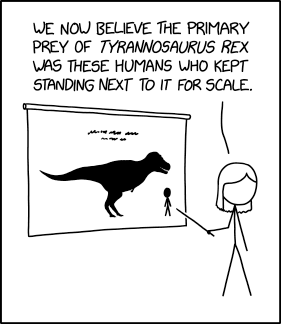
Tyrannosaurus

XKCD · view →
Many of the smaller dinosaurs seem to have largely preyed on housecats.

Many of the smaller dinosaurs seem to have largely preyed on housecats.